
-
Introduction
Course Overview -
Welcome
-
Get ReadyComplete Your Student Profile
-
Upload Your Profile Photo
-
Explore the Course Group
-
What You Need
-
Learning ResourcesAccess Learning Resources
-
The Story Innovation Framework
-
Assignment Vision & GuidelinesLearn On Assignment
-
How to Submit Assignments
-
Submit Work Samples
-
Receive Feedback
-
Keynote Speaker & Guest Editor
-
The Power of StorytellingWhy Storytelling?
-
Let's Talk about Popcorn
-
A True Story
-
Storytelling ScienceStorytelling Culture
-
How Your Brain Responds to Stories
-
The Hollywood Perspective
-
Envision Your CareerAssignment: Envision Your Career
-
The Power of BloggingWhere is Blogging on the StoryInnovation Canvas?
-
The Power of Blogging
-
What Exactly is a Blog?
-
Why Blog?
-
Own Your Topic
-
Be Specific
-
Getting Started
-
WordPress Can Do More Than Just Blogging
-
Know Your Audience
-
Identify Your Target Audience
-
Create a Customer Persona
-
Should I Use a Byline?
-
Blog Often & Link with Others
-
Perfectionism is the Enemy
-
Write Like You Talk
-
Be Specific & Write Short
-
Choosing a Title
-
Blogs Evolve
-
Assignment: Develop an Audience Persona
-
Assignment: Envision Your Blog
-
Cultivating Curiosity and Finding Story IdeasCultivating Curiosity & Finding Story Ideas
-
Novelty & Mystery
-
Questions Inspire Curiosity
-
Question-Asking Exercise
-
Childhood Curiosity
-
Start with a Question
-
Topics vs. Story Ideas
-
Digging Deeper with the 5 Whys
-
Developing News JudgmentEvaluating Newsworthiness
-
News Values
-
Timeliness
-
Proximity
-
Localizing News
-
Prominence
-
Conflict
-
Impact
-
Oddity
-
Interest
-
Assignment: Find 20 Newsworthy Story Ideas
-
Creating Story ProposalsCompleting Your Story Proposal
-
Planning StoriesFrom Story Proposal to Planning
-
InterviewingLearning from Master Interviewers
-
Three Keys to Interviewing
-
Follow-Up Questions
-
Probing Questions & Preceding Statements
-
Taking Notes
-
Pro Tip: Practice Taking Notes
-
Finishing
-
Writing Compelling LeadsWriting Compelling Leads
-
Lead or Lede?
-
Types of Leads
-
Good Reporting Leads to Good Ledes
-
Frame the Lead Early
-
A Promise
-
Tips for Writing an Effective Lead
-
Leads to Avoid
-
Creating TransitionsWhy Transitions are Important
-
Understand Your Story's Structure
-
Four Basic Transitions
-
Designing Effective Transitions
-
When Transitions Fail
-
Formulating Powerful EndingsWriting Compelling Endings
-
Endings Do Three Jobs
-
Types of Endings
-
Barriers to Writing Good Endings
-
AttributionAttribution - Who's Doing the Talking?
-
What is Attribution?
-
How to Attribute Sources
-
Why Said or Says?
-
Using Quotes
-
Why Verify a Quote?
-
Paraphrasing
-
Interrupted Quotes
-
Organizing Attribution
-
Attribution by Hyperlink
-
Tips for Punctuating Quotes
-
Verify Accuracy
-
Partial Quotes
-
Incomplete Quotes
-
Quotes Missing Information
-
When Should You Attribute?
-
How Accurate Does the Quote Have to Be?
-
Structure, Unity and ToneEach Story Has a Unique Shape
-
Structure, Unity & Tone
-
Journalism Before the 20th Century
-
A New Invention Changes Journalistic Style
-
Understanding the Inverted Pyramid
-
The Inverted Pyramid
-
Inverted Pyramid Example
-
Analyze an Inverted Pyramid Example
-
Activity: Order the Facts by Importance
-
Basic Components of a News Article
-
The Hour Glass
-
Narrative
-
Unity
-
Unity: Point of View
-
Changing Perspectives
-
Unity: Tense
-
Navigating Time
-
Unity: Mood
-
Balancing the Need for Showing and TellingStory Structure Checklist
-
Show vs. Tell
-
Why is Showing Important?
-
The Difference Between Showing and Telling
-
Transform Telling into Showing
-
Choose the Most Significant Details
-
Prioritize Showing
-
Introducing Characters
-
Study the Masters of Showing
-
Show in Context
-
Don't Fictionalize the News
-
The Showing Equation
-
When to Tell
-
Eradicating Clutter from Your StorytellingEradicating Clutter
-
Clutter in Everyday Life
-
Clear Thinking Equals Clear Writing
-
Tip: Combine Sentences to Simplify
-
Tips for Eradicating Clutter
-
Remove Clutter with a Simple Process
-
How to Simplify
-
Developing and Verifying SourcesWhispering Chain Sources
-
Where is Source Development on the StoryInnovation Framework?
-
What is a Source?
-
Primary & Secondary Sources
-
Being an Eyewitness
-
Be Careful with Online Sources
-
Identify Key Players
-
Engage Sources
-
Find the Best Source
-
Evaluating Sources
-
Attributing Sources
-
Attribution Levels
-
Verify Accuracy
-
Assignment: Identify & Verify Sources
-
Visual Communication IdeasHow Storytelling Applies to Visual Journalism
-
Some Ideas for Organizing and Editing Visuals
-
Learning Resources for Visual Journalists
-
Study the MastersKnow and Emulate the Masters
-
Learn from Everyone and Everything
-
Study the Best
Participants 17






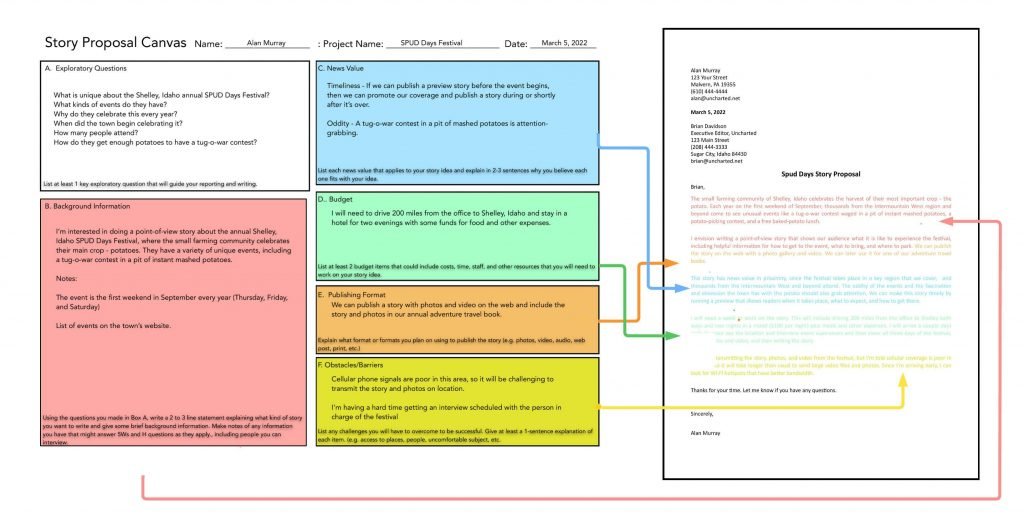
Open the story proposal canvas template, the sample canvas and the sample story proposal letters that you downloaded earlier. If you haven’t downloaded them yet, you can find them below in the Lesson Materials section.
Step 1:
- Begin with the downloaded PowerPoint and Word documents.
- Refer to your list of story ideas, your customer persona assignment and your notes from previous lessons.
- Fill in your name (if working on a team project then use the name of your team), project name (this would be your story idea), and the date.
Step 2:
You can refer to the story proposal sample letter to guide you as you complete the following boxes on the canvas.
- You should consider the key information in Box A through Box F as you prepare to write your proposal.
- Each colored box is connected with the section of that color on the Story Proposal sample letter, as seen in the diagram above. Box A is not color-coded, but its contents can be included with the information from Box B if needed.
- Use the information from each box, starting with Box B and ending with Box F. Write in complete sentences, as is appropriate for writing a letter. If you like, you can use the sample letter as a template for your letter.
- When finished, write a conclusion thanking the editor for reading your proposal. Print your name, and then sign the letter.
- Provide your contact information at the top. Then copy the contact information of the editor from the Story Proposal Sample Letter to the same location in your proposal letter.
Step 3:
- Check your letter for grammar and punctuation errors. If you can, have someone give you feedback. Using the assignment submission form, submit your completed Story Proposal Canvas as a PowerPoint presentation and your completed Story Proposal Letter as a Word document.
- Save a PowerPoint file of the Story Proposal Canvas template following this format for the file’s name: Assignment Category-Story Idea-First Initial-Last Name (eg. Story-Proposal-Canvas-Shelley Spud-Days-C-Matz.ppt)
- Save your story proposal using this format for the file’s name: AssignmentCategory-Story-Idea-First Initial-Last (eg. Story-Proposal-Shelley-Idaho-Spud-Days-C-Matz.docx
Story-Proposal-Example-Raptor-Rehab
Story-Proposal-Example-Organ-Donation
Story-Proposal-Example-Dealing-with-Death
Story-Proposal-Example-Shelley-Idaho-Spud-Days.pdf
Story-Proposal-Example-Shelley-Idaho-Spud-Days.docx
Story-Proposal-Canvas-Example-1
Story-Proposal-Canvas-Assignment-Template - You can print this pdf and write on it, take a photo of it or scan it, and then submit it.
Story-Proposal-Canvas-Assignment-Template This is PowerPoint file that will open in either PowerPoint or Keynote. You can type on this, then export it as a pdf, and submit.
Responses